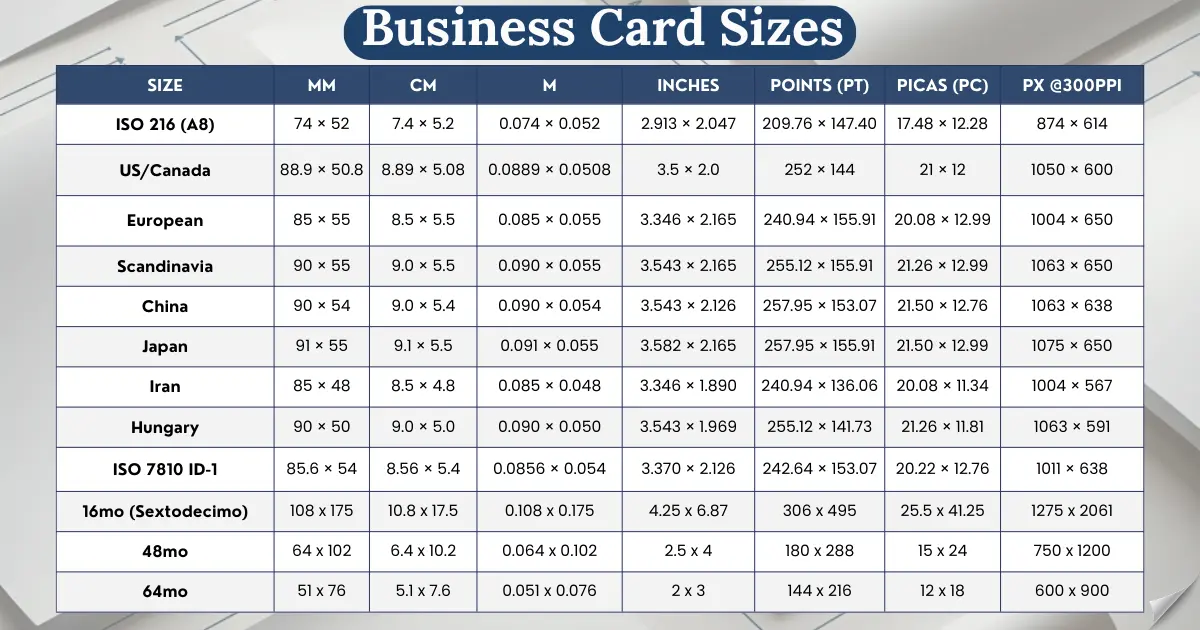
Business cards sizes vary globally: US uses 3.5″ × 2.0″ (88.9mm × 50.8mm), Europe uses 85mm × 55mm, Japan 91mm × 55mm, with different standards across Scandinavia, China, Hungary, Iran, and ISO formats. Understanding these dimensions ensures your cards fit local wallets and meet professional standards worldwide.
Proper design requires bleed area, trim line, and safe area at 300 DPI in CMYK color mode. Common mistakes include text too close to edges, low-resolution images, missing bleed, and using RGB colors—errors that cause reprints at Office Depot, Vistaprint, MOO, and FedEx Office.
In this guide we cover every international business card standard, from US and European sizes to Japanese, Chinese, and Scandinavian specifications. You’ll learn exactly which size to use, how to design for different markets, and what mistakes to avoid when printing.
Complete International Business Card Size Conversion Table
Business card dimensions vary dramatically across countries. What works in New York won’t work in Tokyo, London, or Beijing. Here’s the complete breakdown of every major international standard:
US/Canada Business Cards
The North American standard dominates in the United States, Canada, and Mexico. Every major US printer—including Staples, FedEx Office, and Office Depot—uses this exact size as default.
In design measurements: The card measures 252 points × 144 points, or 21 picas × 12 picas. At 300 DPI (dots per inch), your design file should be 1050 pixels × 600 pixels for sharp, professional printing.
This size fits American wallets perfectly because it matches the aspect ratio of credit cards and driver’s licenses. The 1.75:1 ratio (width to height) became standard because of this wallet compatibility.
European Business Cards
The European standard measures 85mm × 55mm (3.346″ × 2.165″). This size is used across the United Kingdom, Ireland, France, Germany, Italy, Spain, and most EU countries.
In pixels at 300 DPI, European cards measure 1004 × 650 pixels. In points, that’s approximately 241pt × 156pt. The metric system makes these measurements cleaner than US conversions.
The aspect ratio is 1.545:1, making these cards slightly more square than US cards. This gives designers more vertical space for logos, titles, and contact information.
European wallets are built for this size. Try fitting a US business card (3.5″ × 2.0″) into a European cardholder, and you’ll notice it’s slightly too wide and not tall enough.
Scandinavian Business Cards
Sweden, Norway, Denmark, and Finland use 90mm × 55mm (3.543″ × 2.165″). This is the widest common European standard.
At 300 DPI, Scandinavian cards require 1063 × 650 pixels. The extra 5mm of width compared to standard European cards provides valuable design space.
Scandinavian design culture favors minimalism and clean layouts. The extra width (9cm instead of 8.5cm) allows for more breathing room around text and logos, supporting the Nordic aesthetic of simplicity.
Japanese Business Cards
Japan uses 91mm × 55mm (3.582″ × 2.165″)—the widest international standard. These cards are called “Meishi” (名刺) and play a crucial role in Japanese business culture.
Your design file needs to be 1074 × 650 pixels at 300 DPI. In centimeters, that’s exactly 9.1cm × 5.5cm. The precision matters in Japanese business etiquette.
The Meishi Koukan ceremony (business card exchange ritual) requires standard-sized cards. Research from the Japan External Trade Organization shows that using non-standard sizes is considered disrespectful in formal business settings.
Chinese Business Cards
China’s standard size is 90mm × 54mm (3.543″ × 2.126″). It’s nearly identical to Scandinavian dimensions but 1mm shorter in height.
Design files should be 1063 × 638 pixels at 300 DPI. The 9cm × 5.4cm format provides space for dual-language printing—English on one side, Chinese characters on the other.
Bilingual cards are essential in Chinese business culture. According to Harvard Business Review’s research on Asian business practices, presenting a card with Chinese text shows respect and increases trust.
Hungarian Business Cards
Hungary uses 90mm × 50mm (3.543″ × 1.969″), making it one of the narrower European standards. The 9cm width matches Scandinavian and Chinese cards, but the 5cm height is unique.
At 300 DPI, Hungarian cards measure 1063 × 591 pixels. This 1.8:1 aspect ratio is the most elongated of all international standards.
The narrower format suits Hungarian and Central European wallet designs. While less common globally, it’s the expected standard for business in Hungary, Romania, and parts of Eastern Europe.
Iranian Business Cards
Iran’s standard of 85mm × 48mm (3.346″ × 1.890″) is the most compact internationally. The width matches European cards, but the height is significantly smaller.
Design files need 1004 × 567 pixels at 300 DPI. In centimeters, that’s 8.5cm × 4.8cm—the smallest standard that’s widely used for professional business cards.
Right-to-left text layout is essential for Farsi (Persian) language cards. If you’re designing for Iranian clients, ensure your design software supports RTL text direction.
ISO 216 Standard – A8 Format
ISO 216 is the international paper size standard that includes A4, A5, and other A-series formats. The A8 size measures 74mm × 52mm (2.913″ × 2.047″).
A8 business cards require 874 × 614 pixels at 300 DPI. This is the smallest A-series format used for business cards, though it’s rarely seen in practice.
The A8 format is almost square with a 1.423:1 ratio. It’s occasionally used in Germany and parts of Western Europe by minimalist designers or tech startups.
Why so uncommon? Most businesses prefer the standard 85mm × 55mm European size because it fits existing cardholders and wallets better than the narrower A8.
ISO 7810 ID-1 Standard
ISO 7810 ID-1 is the international credit card standard, measuring 85.6mm × 54mm (3.370″ × 2.125″). This is the exact size of credit cards, debit cards, and identification cards worldwide.
Design files should be 1010 × 638 pixels at 300 DPI. This size is perfect for PVC plastic business cards that need to fit in standard card reader slots.
Plastic business cards and membership cards almost always use this dimension. The standardization means your card works in any wallet, cardholder, or badge sleeve globally.
According to the International Organization for Standardization, ISO 7810 ID-1 is the most universally compatible card size across all countries and industries.
Business Card Design Specifications
Every printed business card needs three critical zones: bleed area, trim line, and safe area. Understanding these prevents your design from getting cut off or looking unprofessional.
Bleed is the extra space beyond your final card size. Standard bleed is 0.125 inches (3mm or approximately 9 pixels at 300 DPI) on all four sides. This ensures no white edges appear if the cutting machine is slightly off-center.
US Business Card Specifications (3.5″ × 2.0″)
Your design file dimensions:
Keep all text, logos, and important elements inside the safe area. Anything between the safe area and trim line might get cut during printing.
Background colors and patterns should extend to the bleed edge. If your design has a colored background, it must reach the 3.75″ × 2.25″ outer boundary.
European Business Card Specifications (85mm × 55mm)
European card design dimensions:
The 3mm bleed standard is universal across US and European printing. Always add this margin regardless of which country you’re printing in.
Resolution Requirements for Sharp Printing
300 DPI (dots per inch) is the minimum resolution for professional printing. Anything lower—like 150 DPI or 72 DPI—will look blurry and pixelated when printed.
Vector graphics (SVG, AI, EPS files) don’t have DPI limits because they’re mathematical formulas, not pixels. Logos should always be vector format when possible.
Color Mode: CMYK vs RGB
All print files must use CMYK color mode, not RGB. Computer screens display color using RGB (Red, Green, Blue), but printers use CMYK (Cyan, Magenta, Yellow, Black).
RGB colors often look different when converted to CMYK. Bright blues, vibrant greens, and neon colors shift dramatically. According to Pantone’s Color Guide, about 35% of RGB colors cannot be accurately reproduced in CMYK printing.
Convert your design to CMYK before finalizing. In Adobe Illustrator, Photoshop, or InDesign, go to File → Document Color Mode → CMYK Color.
File Formats for Printing
PDF is the preferred format for professional printing. Save your file as “High Quality Print” or “Press Quality” PDF with bleed marks included.
Other accepted formats:
AI (Adobe Illustrator) – Best for vector designs
EPS (Encapsulated PostScript) – Universal vector format
PSD (Photoshop Document) – For image-heavy designs
TIFF – High-resolution raster images
Never submit JPG, PNG, or GIF files for printing unless you’re using an online tool that specifically requests them. These formats compress images and reduce quality.
Typography and Font Considerations
Minimum font size for printed text is 6 points (pt). Anything smaller becomes difficult to read, especially for phone numbers and email addresses.
Recommended font sizes:
Name: 12-14pt
Job title: 9-11pt
Contact information: 8-9pt
Address/website: 7-8pt
Embed or outline all fonts before sending to print. If the printer doesn’t have your font installed, they’ll substitute it with something else, ruining your design.
Common Design Mistakes That Ruin Prints
Placing text too close to edges is the #1 design error. Even with perfect cutting, text closer than 0.125″ (3mm) to the edge looks unprofessional and cramped.
Using low-resolution images from websites (usually 72 DPI) causes blurry, pixelated prints. Always use original high-resolution photos or vector graphics.
Forgetting to include bleed area results in white edges if the cutting is slightly off-center. Every printer requires bleed—no exceptions.
Not converting RGB to CMYK means your vibrant blue might print as dull purple, or your bright red might appear brownish.
Alternative Business Card Sizes & When to Use Non-Standard Dimensions
Alternative Business Card Sizes
When to Use Non-Standard Dimensions
Standard sizes work for 95% of businesses, but creative industries sometimes benefit from unique dimensions. Understanding these prevents printing errors.
Square Business Card
The classic social media format. Mimics Instagram posts. Perfect balance of space.
Best For
Photographers, Instagram influencers, Creative agencies.
Downside
Doesn’t fit standard wallets or business card holders.
Mini Business Card
Narrower than standard width. Memorable footprint. Cost-effective.
Best For
Hairstylists, Musicians, Event planners.
Downside
Space limitation is severe. Only fits name & tiny logo.
Folded Business Card
Opens like a book. Four printable surfaces. Great for listings, menus.
Best For
Salons, Restaurants, Medical offices.
Downside
Higher printing cost (50-75% more) due to scoring.
Slim Business Card
Standard width, but half the height. Contemporary statement.
Best For
Tech startups, Minimalist brands, Design firms.
Downside
The ultra-narrow format forces extreme minimalism. Limits text significantly.
Die-Cut & Custom Shapes
Any shape imaginable—circles, ovals, bottles, houses.
Unique shapes don’t fit in standard holders. High MOQs for printing.
Best For
Real Estate, Restaurants, Retail brands.
Downside
Storage is problematic. Cards get lost or discarded.
Standard sizes work for 95% of businesses, but creative industries sometimes benefit from unique dimensions. Here’s when to break the rules.
Square Business Cards
Square cards measure 2.5 inches × 2.5 inches in the US (64mm × 64mm internationally). At 300 DPI, that’s 750 × 750 pixels.
Best for: Photographers, Instagram influencers, artists, and creative agencies. The square format mimics social media post dimensions and feels modern.
The downside? Square cards don’t fit standard wallets, business card holders, or Rolodexes. Many people fold or damage them trying to store them.
Cost consideration: Square cards typically cost 20-30% more than standard sizes due to custom cutting requirements.
Mini Business Cards
Mini cards are roughly half the width of standard cards. They measure 2.75″ × 1.1″ (70mm × 28mm) in the US, or 825 × 330 pixels at 300 DPI.
Popular among: Hairstylists, musicians, event planners, and budget-conscious startups. The smaller size is memorable and costs less to print.
Space limitation is severe. You can fit your name, phone number, and maybe a logo—nothing else. Email addresses and physical addresses often get omitted.
Folded Business Cards
Folded cards open like a book, giving you four printable surfaces instead of two. When closed, they’re standard US size (3.5″ × 2.0″).
At 300 DPI, the unfolded design is 1050 × 1200 pixels. You can fit service menus, appointment calendars, or product showcases inside.
Best for: Salons, restaurants, medical offices, and service businesses that need to list multiple offerings or appointment times.
Cost is higher—expect to pay 50-75% more than standard flat cards due to the scoring (folding crease) and thicker cardstock requirements.
Slim Business Cards
Slim cards are standard width but half the height, measuring 3.5″ × 1.0″ (88.9mm × 25.4mm). At 300 DPI, that’s 1050 × 300 pixels.
Used by: Tech startups, minimalist brands, and modern design firms. The slim profile makes a contemporary statement.
The ultra-narrow format forces extreme minimalism. Expect to fit only your name, one contact method (like email or phone), and possibly a tiny logo.
Die-Cut and Custom Shapes
Die-cut cards use custom cutting to create unique shapes—circles, ovals, bottle shapes, house silhouettes, or anything imaginable.
Popular in industries like: Real estate (house-shaped cards), restaurants (menu-shaped cards), fitness (dumbbell-shaped cards), and retail (product-shaped cards).
Minimum order quantities are usually higher (500-1000 cards instead of 100) because custom dies are expensive to create. According to industry data, custom shapes cost 3-5x more than standard rectangles.
Storage remains problematic. Unique shapes don’t fit in standard holders, making them more likely to be lost or discarded.
Where to Print Business Cards
Every major printer supports standard US business card dimensions (3.5″ × 2.0″), but international sizes and custom formats vary by provider.
Office Depot Business Cards
Office Depot prints standard 3.5″ × 2.0″ business cards with same-day and next-day options available at most locations.
Paper options include:
80lb cardstock – Basic, budget-friendly option
100lb cardstock – Premium, more durable feel
Glossy or matte finishes available
Pricing at Office Depot: 100 cards start at $9.99 for basic printing, ranging up to $39.99 for premium stock with advanced finishes. According to their current pricing, the average order is $24.99 for 100 cards.
International sizes: Office Depot does not support European, Asian, or other international dimensions. You’re limited to US standard size only.
Vistaprint Business Card Sizes
Vistaprint offers the most size variety of any major printer:
Standard US: 3.5″ × 2.0″
Square: 2.5″ × 2.5″
Rounded corners on standard size
European size available for international shipping
Paper thickness ranges from 14pt to 18pt, with various finishes including matte, glossy, pearl, linen, and recycled options.
Pricing at Vistaprint: 100 standard cards start at $19.99, while premium options (thick stock, special finishes) range from $49.99 to $99.99 per 100 cards.
International printing: Vistaprint ships to over 100 countries and supports European standard sizes (85mm × 55mm) for customers outside North America.
MOO Business Cards
MOO specializes in premium business cards with unique features like Printfinity (different designs on every card in your pack).
Available sizes:
US Standard: 3.5″ × 2.0″
UK/European: 85mm × 55mm
Square: 2.56″ × 2.56″
Mini: 2.75″ × 1.1″
Premium paper options include 16pt, 19pt, and luxe 32pt ultra-thick cardstock. MOO also offers cotton, soft touch, and textured finishes.
Pricing at MOO: 50 cards start at $22.00, with 100 cards ranging from $43.00 to $120.00 depending on paper quality and finishes.
International support is excellent. MOO operates separate sites for US, UK, and European customers, each defaulting to regional standard sizes.
FedEx Office Business Cards
FedEx Office offers two tiers:
Quick business cards (ready same-day or next-day)
Premium business cards (3-5 business days)
Standard size only: 3.5″ × 2.0″ for both tiers. Custom sizes require special orders through commercial printing division.
Quick cards use 100lb matte cardstock at $13.99 for 100 cards (single-sided) or $17.49 (double-sided). Premium cards start at $39.99 for 100 cards with enhanced paper stocks.
In-store pickup available at 2,000+ locations makes FedEx Office convenient for urgent orders, though international size options are limited.
Online Printing Services
Online-only printers typically offer more international size options because they serve global markets:
Printful: Supports US, European, and custom sizes with worldwide shipping
GotPrint: Offers 15+ size variations including international standards
Zazzle: Custom sizing available, ships internationally
Turnaround times are longer (5-10 business days) compared to local print shops, but pricing is often 30-40% lower for bulk orders.
Price and Quality Comparison
Paper thickness matters for perceived quality. Standard 14pt cardstock feels flimsy, while 18pt or 32pt ultra-thick cards feel premium and durable.
For international business: MOO and Printful offer the best support for European, Asian, and other global standards. Office Depot and FedEx Office focus exclusively on the US market.
FAQ’s (Business Card Sizes)
What is the standard business card size?
The standard business card size is 3.5″ × 2.0″ (88.9mm × 50.8mm) in the United States and Canada. In Europe, the standard is 85mm × 55mm (3.346″ × 2.165″). International standards vary by country—Japan uses 91mm × 55mm, while China uses 90mm × 54mm.
Is A7 a business card size?
No, A7 is not a business card size. A7 measures 74mm × 105mm (2.913″ × 4.133″) and is portrait-oriented. It’s used for small notecards and invitations, not business cards. The closest A-series format is A8 (74mm × 52mm), which is rarely used for business cards.
What size is an A5 card?
A5 measures 148mm × 210mm (5.827″ × 8.268″)—exactly half of A4 paper. This size is used for flyers, booklets, notepads, and promotional postcards, not business cards. A5 is more than four times larger than a standard US business card.
Is 5×7 a normal card size?
Yes, 5×7 inches (127mm × 178mm) is a standard size for greeting cards, invitations, and announcements. However, it’s not used for business cards—it’s more than double the size of standard business cards and doesn’t fit in wallets.
Are cards 4×6 or 5×7?
Neither is a business card size. 4×6 inches (102mm × 152mm) is the standard postcard and photo print size. 5×7 inches (127mm × 178mm) is used for greeting cards. Business cards are 3.5″ × 2.0″ in the US and 85mm × 55mm in Europe.
What is a common mistake on business cards?
The most common mistake is placing text too close to the edges, causing it to be cut off during trimming. Other frequent errors include using low-resolution images (below 300 DPI), designing in RGB instead of CMYK, forgetting the bleed area, and overcrowding information.
Do people still use business cards in 2026?
Yes, business cards remain essential in 2026. Research shows 72% of professionals still carry business cards regularly. They’re particularly important in Asia, real estate, sales, networking events, and international business. Modern trends include QR codes, NFC chips, sustainable materials, and minimalist designs.
What size are Office Depot business cards?
Office Depot business cards are the standard US size: 3.5″ × 2.0″ (88.9mm × 50.8mm). They offer 80lb and 100lb cardstock options with matte or glossy finishes. Office Depot does not support international sizes like European 85mm × 55mm.
Conclusion
Choosing the right business card size is simple once you know your market. For US businesses, stick with the standard 3.5″ × 2.0″ (88.9mm × 50.8mm). For international work, European 85mm × 55mm offers the widest global compatibility.
Always remember the three design zones: bleed area (where backgrounds extend), trim line (your final card size (where text and logos stay safe).e), and safe area Design at 300 DPI in CMYK color mode for sharp, professional prints.
Before you order, double-check your specifications. A quick file review saves money on reprints and ensures your business cards make the perfect first impression every time.

Hi, I’m Steven Henry, the creator behind Papersizechart.com. My goal is to make measurements easy for everyone, from paper sizes to everyday dimensions. I help you find the right paper for printing, crafts, or school projects and understand the measurements you need for your space or projects—all without the confusion. Let’s explore guides and charts together, so you can work with paper and dimensions confidently for any task.